Find your way around
This page shows you what each part of the PlainSpeak window is for.
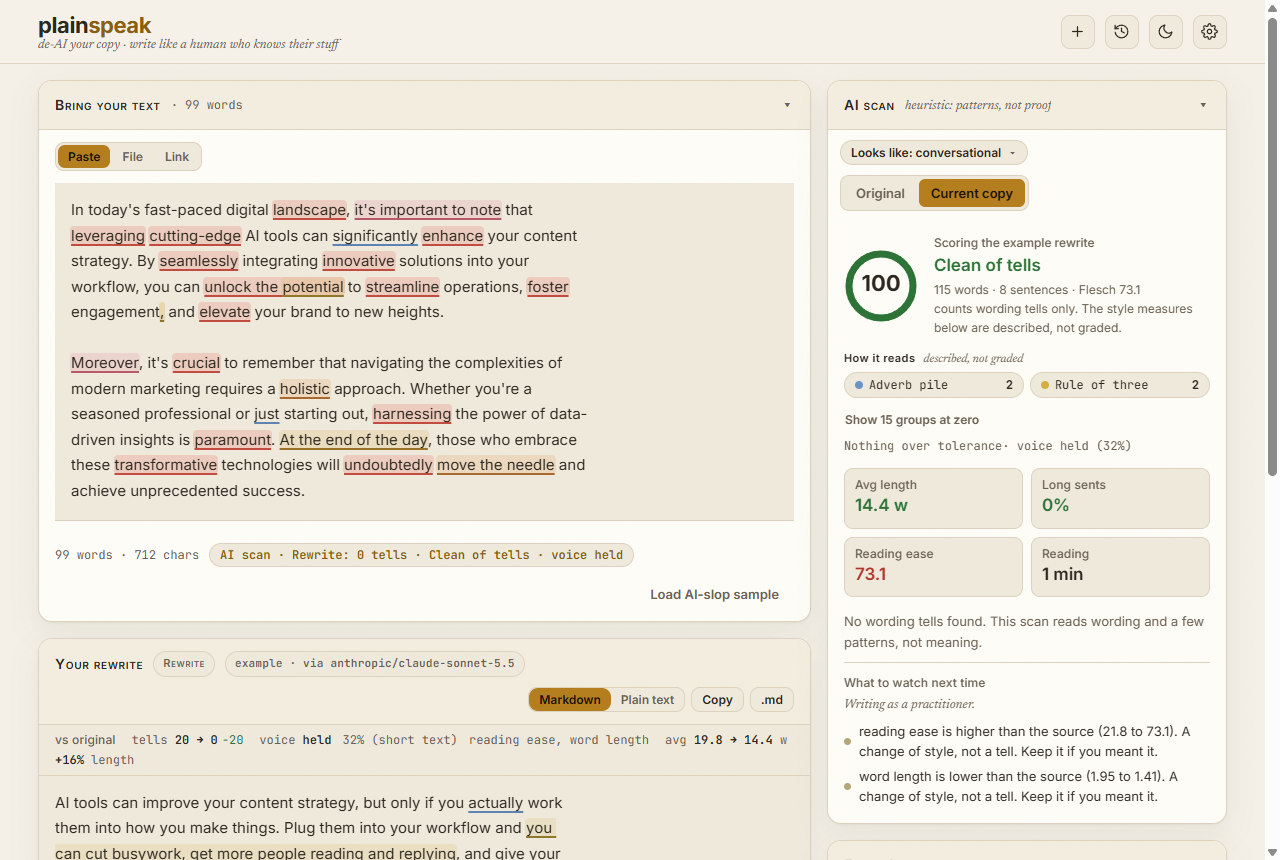
Your text
The Bring your text panel holds the draft you start from. Choose how to bring it in:
- Paste: paste or type your draft.
- File: open a
.txtor.mdfile. You can also drag a file onto the window. - Link: fetch the text of a public web page, such as a public Notion page.
Load AI-slop sample fills the panel with an example draft and an example rewrite, so you can try everything before you add a key.
The rewrite
The Your rewrite panel shows the rewrite. You can edit it by hand, and the scan updates as you type.
| Control | What it does |
|---|---|
| Recipe button | Opens the Rewrite recipe: the model, the mode, the voice and the length. |
| Rewrite | Starts a rewrite. Ctrl+Enter does the same. |
| Restart | Clears the rewrites and goes back to your original text. |
| Audit with two other models | When ticked, two other AI models read each rewrite and point at anything that still sounds generated. It costs about two cents and needs an OpenRouter key. |
| Markdown or Plain text | Chooses what Copy puts on your clipboard: with formatting, or without it. |
| Copy | Copies the rewrite. |
| .md | Downloads the rewrite as a Markdown file. |
Each rewrite is saved as a version. Select a version above the rewrite to go back to it.
The panels on the right
- AI scan: the score, the tells it found, and how the text reads. Switch between Original and Current copy to compare your draft with the rewrite. The Looks like button shows what kind of piece PlainSpeak thinks you pasted, such as long-form or social, and lets you correct it.
- Facts & sources: the numbers, dates, links and quotes in your original, checked against the rewrite. Find sources looks for a source for each claim that has none.
- Audit: what the two audit models said about the rewrite, when the audit is on.
- About PlainSpeak: what the scan and the facts check can and cannot tell you, in five short lines, with a link to What PlainSpeak cannot do. It starts folded away.
Select a panel's title to fold it away or open it again. PlainSpeak remembers which panels you keep open.
The buttons at the top right
| Button | What it does |
|---|---|
| Bell | Appears when an update has downloaded. Select it to install the update now, or leave it to install when you quit. |
| + | Starts a new piece. |
| Clock | Opens your History of past pieces and rewrites. |
| Sun or moon | Switches between light and dark. |
| Gear | Opens Settings: your AI provider and key, your licence, voices, templates and your writing baseline. |